Showing posts with label Leni Lens. Show all posts

Thursday, July 21, 2011

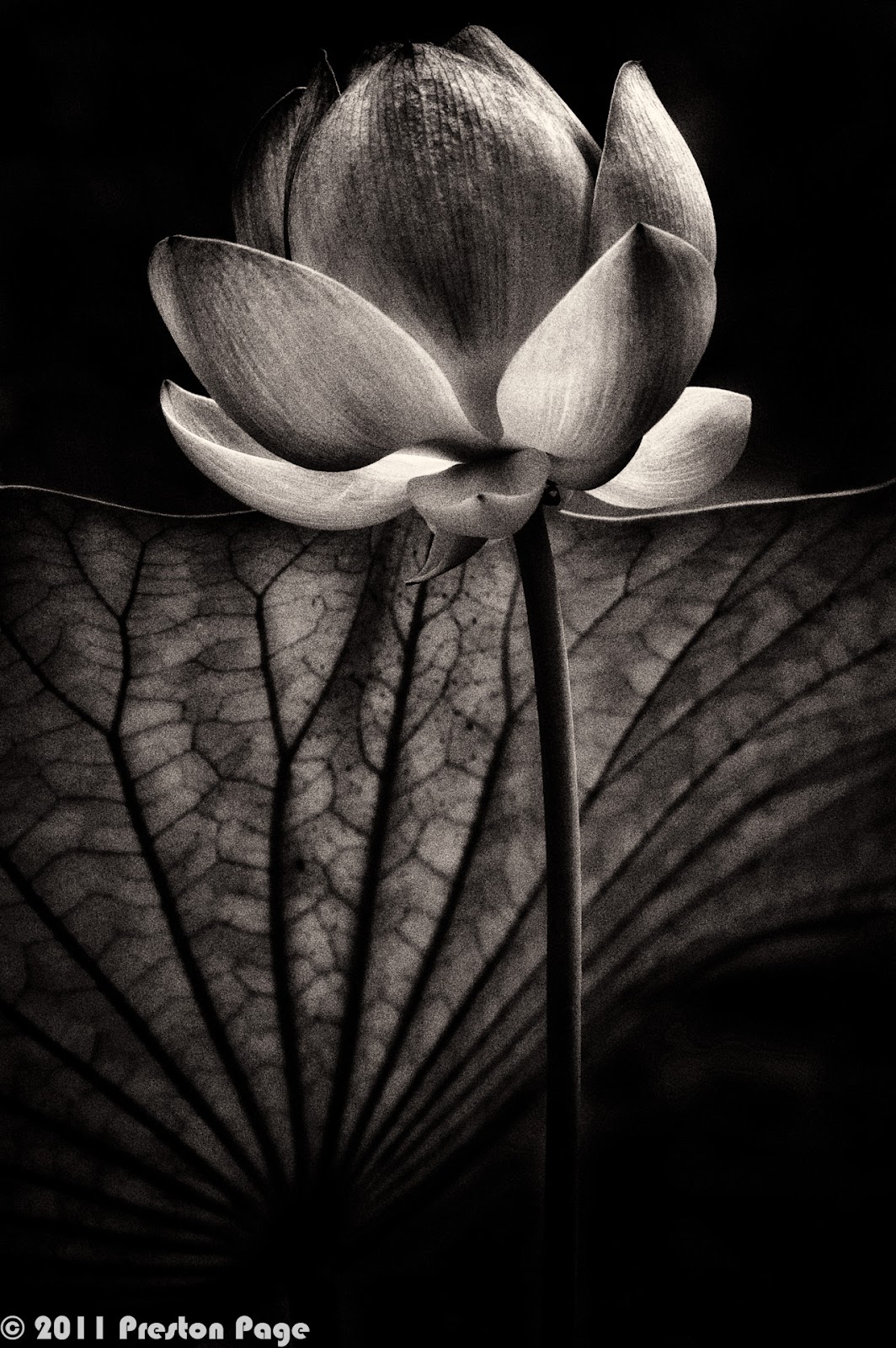
Lotus Blossom #12, HDR


One last lotus blossom for the season, adjacent to the previous post.  Even though the angle in relation to the sun was only about 15 degrees different, the full back lit glow is missing.  Still, I liked the composition and clicked off the bracket series.


The monochrome generated by Nik Silver Efex Pro 2 is a platinum print preset I developed.

Technical
Camera: Nikon D700
Lens: AF NIKKOR 180mm f/2.8D IF-ED "Leni Lens"
Exposure: ISO 200, 3 brackets around f/8.0 @ 1/200s, Auto WB, RAW
Lighting: Hazy sunlight
Support: Gitzo Basalt Tripod, Acratech GP-2 w/leveling base, RRS L-Bracket
Location:  Missouri Botanical Gardens, St. Louis
Dates: Capture - July 16, 2011, Processed July 17, 2011
Processing: Lightroom 3, Photoshop CS5, Nik HDR Efex, Nik Silver Efex Pro 2

Sunday, July 17, 2011

Lotus Blossom #11, HDR Variations

#1 - "CSI Miami" treatment
A handful of lotus flowers were still in bloom in the Japanese Garden at the Missouri Botanical gardens last Saturday morning.  A hazy sun back light really brought out detail and texture, captured by the magical Nikon 180mm "Leni Lens".  I wound up making four versions and would love to hear from you if you have a preference.  The last step for #1 was to apply a partial "CSI Miami" glow effect in Nik Color Efex Pro.

#2 - "Platinum Print" process
Inspired by the exquisite work by Irving Penn, I came up with a Nik Silver Efex Pro 2 process preset that is very close to the look of a Platinum-Palladium process, especially when printed on a good matte paper.

#3 - "Lens Baby" filter
As an experiment, I decided to use the Nik Color Efex Pro 3 "Vignette Blur" tool to simulate the Lens Baby look.

#4 - Grainy Nude process
This monochrome processing preset in Lightroom 3 started out as an approach for nudes, but it has come in handy for botanical subjects, too.


Technical
Camera: Nikon D700
Lens: AF NIKKOR 180mm f/2.8D IF-ED "Leni Lens"
Exposure: ISO 200, 3 brackets around f/8.0 @ 1/200s, Auto WB, RAW
Lighting: Hazy sunlight
Support: Gitzo Basalt Tripod, Acratech GP-2 w/leveling base, RRS L-Bracket
Location:  Missouri Botanical Gardens, St. Louis
Dates: Capture - July 16, 2011, Processed July 17, 2011
Processing: Lightroom 3, Photoshop CS5, Nik HDR Efex, Nik Silver Efex Pro 2

Thursday, May 19, 2011

Lunar Corona #1, HDR Variations


Even though the subject is a Lunar Corona, the story here are the surrounding clouds.  Here I used the color "Dark City" processing in Nik HDR Efex combining two exposures.  The second moon is lens flare.


The monochrome from Nik Silver Efex Pro 2 uses my "Toned Platinum" custom preset.


Finally, solarization in Nik Color Efex Pro creates a bas relief effect for the clouds.

Technical
Camera: Nikon D700
Lens: AF NIKKOR 180mm f/2.8D IF-ED "Leni Lens"
Exposure: ISO 400, 2 brackets around f/2.8 @ 1s, Daylight WB, RAW
Lighting: Moonlight
Support: Gitzo Basalt Tripod, Acratech GP-2, RRS L-Bracket
Location: Ballwin, MO
Dates: Capture - April 17, 2011, Processed May 18, 2011
Processing: Lightroom 3.3, Photoshop CS5, Nik HDR Efex, Nik Silver Efex Pro 2, OnOne PhotoFrame Free

Monday, May 16, 2011

Lunar Corona, HDR Variations


A Lunar corona is seen when the clouds are thin enough that each single corona light ray reaching the eye (or camera) is scattered or diffracted by only one droplet or ice crystal.  When I composed the moon off center, the corona vanished.  This first variation was processed in Nik HDR Efex for tone contour mapping, Photoshop for levels adjustment, Nik Color Efex Pro to create a Fresson print and finally Nik Dfine to reduce noise.


I wanted to see how well the image would hold up as a monochrome, so this is the result of processing in Nik Silver Efex Pro 2 with a strong blue filter and Cyanotype toner.


I'm really on the fence with regard to purchasing OnOne PhotoFrame.  I love a number of the effects, but do I really need this one?  It is kind of creepy, so maybe I do...


Finally, a acid wash variation from OneOne PhotoFrame Free.  Nice grunge feel, I think.

Technical
Camera: Nikon D700
Lens: AF NIKKOR 180mm f/2.8D IF-ED "Leni Lens"
Exposure: ISO 400, 5x brackets around f/2.8 @ 1s, Daylight WB, RAW
Lighting: Moonlight
Support: Gitzo Basalt Tripod, Acratech GP-2, RRS L-Bracket
Location: Ballwin, MO
Dates: Capture - April 17, 2011, Processed May 16, 2011
Processing: Lightroom 3.3, Photoshop CS5, Nik HDR Efex, Nik Silver Efex Pro 2, OnOne PhotoFrame Free

Monday, April 18, 2011

Blue Moon, HDR Test


This picture is the result of five brackets stacked in Nik HDR Efex using the "Foggy Night" preset as the starting point.  The long exposures smeared the trees and clouds somewhat.  I'll be working on it further, but thought I'd share this first test.

Technical
Camera: Nikon D700
Lens: AF NIKKOR 180mm f/2.8D IF-ED "Leni Lens"
Exposure: ISO 400, 5x brackets around f/2.8 @ 1s, Daylight WB, RAW
Lighting: Moonlight
Support: Gitzo Basalt Tripod, Acratech GP-2, RRS L-Bracket
Location: Ballwin, MO
Dates: Capture - April 17, 2011, Processed April 17, 2011
Processing: Lightroom 3.3, Photoshop CS5, Nik HDR Efex, Nik Silver Efex Pro 2

Sunday, April 17, 2011

Full Moon, April 17, 2011


View from our back yard this evening.  The image was processed in Lightroom 3, Nik HDR Efex, Photoshop CS5 and Nik Silver Efex Pro 2.


Technical
Camera: Nikon D700
Lens: AF NIKKOR 180mm f/2.8D IF-ED "Leni Lens"
Exposure: ISO 400, f/4.0 @ 1,3s, Daylight WB, RAW
Lighting: Moonlight
Support: Gitzo Basalt Tripod, Acratech GP-2, RRS L-Bracket
Location: Ballwin, MO
Dates: Capture - April 17, 2011, Processed April 17, 2011
Processing: Lightroom 3.3, Photoshop CS5, Nik HDR Efex, Nik Silver Efex Pro 2

Saturday, April 9, 2011

Untitled detail In Dark City Variations


This detail of "Untitled" by Keith Haring in City Garden was taken from a vantage point just a few feet away from my last post, "Arch and Old Courthouse In Dark City".  The faint detail in he middle is the top of the Old Courthouse.  Pete Turner used to pump up the saturation and contrast of his pictures by making multiple generations of Kodachrome dupes.  I did the same thing here using Nik Color Efex Pro to convert the picture to Kodachome 64 Professional twice.


The Tintype preset for Nik Silver Efex Pro 2 uses a sharp blue filter to emulate the vintage process.  The result here feels very Zen-like to me.


This is the first generation Kodachrome conversion and the basis for all the monochrome conversions.


Nik Silver Efex Pro 2 has a vintage preset called Yellow 2 that I've uses a few times now.  I like the dingy yet glowing feel it can impart.


This cyanotype conversion has the longest tonal scale of any of the processes I used.


Finally, this partial solarization made in Nik Color Efex Pro was split toned sepia with blue shadows in Lightroom 3.

Technical
Camera: Nikon D700
Lens: AF NIKKOR 180mm f/2.8D IF-ED
Exposure: ISO 200, f/8.0 @ 1/400s, Auto WB, RAW
Lighting: Morning daylight and shade
Support: Handheld
Location: City Garden, St. Louis GPS
Dates: Capture - April 11, 2010, Processed - April 9, 2011
Processing: Lightroom 3.3, Photoshop CS5, Nik HDR Efex, Nik Silver Efex Pro, Nik Color Efex Pro

Sunday, January 30, 2011

Sand Beach on the Meramec River, HDR Variations


For a project I'm tentatively calling "Dark City", I established a processing workflow.  So far I've been using it only on cityscapes, but I thought the muted jewel tone color transformation might work on some natural landscape.  This series is my first experiment.  The processing steps: single image tone mapping in Nik HDR Efex, levels adjustment in Photoshop CS5, tweak in Nik Vivenza, crop in Lightroom 3 and apply a small amount of glow in Nik Color Efex Pro.      


Monochrome with blue/sepia split tone created in Nik Silver Efex Pro.


Back in Nik Color Efex Pro to make a Polaroid Transfer, just for fun.  I like how it looks more painterly, sort of like a water color.

Technical
Camera: Nikon D700
Lens: AF NIKKOR 180mm f/2.8D IF-ED "Leni Lens"
Exposure: ISO 200, f/8.0 @ 1/500s, Auto WB, RAW
Lighting: Morning daylight
Support: Handheld
Location: Castlewood State Park GPS
Dates: Capture - April 11, 2010, Processed - January 23, 2011
Processing: Lightroom 3.3, Photoshop CS5, Nik HDR Efex, Nik Silver Efex Pro, Nik Color Efex Pro

Sunday, January 23, 2011

Neo-Classical in Modern Variations


The idea of the neo-classical building "trapped" inside the modern building was impetus behind the shutter click.  My main concern was to make it read properly and be a stylistic fit with other pictures from City Garden.  I don't know which of these variations I prefer yet, so please comment.  Starting with a naturalistic single image tone mapping in Nik HDR Efex helped bring out structure and color, I added some "CSI Miami" glow to make it look less harsh.


  The naturalistic, minimal processing here is pleasant, but lacks the acid punch.


This is the single image tone mapped image straight out of Nik HDR Efex.


Another approach to soften the HDR grunge is to run the shot through the Polaroid Transfer preset in Nik Color Efex Pro.


This monochrome attempt made in Nik Silver Efex Pro using a green filter and blue/sepia split tone doesn't "read" as well as the color because the reflection and stone tones are too close.

Technical
Camera: Nikon D700
Lens: AF NIKKOR 180mm f/2.8D IF-ED "Leni Lens"
Exposure: ISO 200, f/8.0 @ 1/400s, Auto WB, RAW
Lighting: Morning daylight and shade
Support: Handheld
Location: City Garden, St. Louis GPS
Dates: Capture - April 11, 2010, Processed - January 23, 2011
Processing: Lightroom 3.3, Photoshop CS5, Nik HDR Efex, Nik Silver Efex Pro, Nik Color Efex Pro

Friday, December 3, 2010

Grid #16a-b, HDR Polaroid Transfer


This shot went through a number of processing steps.  First, the RAW file was cropped to 11x14 proportion, straighted and vertical lines made parallel in Lightroom 3.  Next, the image got single file HDR tone mapping in Nik HDR Efex.  The HDR image got minor levels and curves adjustments in Photoshop CS5.  Contrast and structure got a boost in Nik Vivenza and finally, processed as a Polaroid Transfer in Nik Color Efex Pro.


The monochrome conversion came from the precursor to the Polaroid transfer, processed in Nik Silver Efex Pro using a sharp green filter.  The sepia/blue split tone added in Lightroom 3.

Camera: Nikon D700
Lens: AF NIKKOR 180mm f/2.8D IF-ED ("Leni Lens")
Exposure: ISO 200, f/8.0 @ 1/200s
Support: Handheld
Lighting: North Skylight
Location: Clayton, MO
Dates: Capture - September 11, 2010, Processed - December 3, 2010
Processing: RAW in Lightroom 3 and Nik Silver Efex Pro

Friday, October 8, 2010

Dying Sunflower #5, Nik HDR Efex


I was able to purchase Nik Software's new Nik HDR Efex a few days ahead of the official release on October 11th.  To give it a shakedown, I turned it loose on my first HDR effort, a dying sunflower.  The picture above is processed from three brackets.  I'm very uncertain at this point about workflow.  Because I could not find a way to launch HDR Efex from Lightroom, I had to find the pictures in Bridge, and kick off the tool from here.  Above is more or less the a default, straight processing.  Compared to Adobe's HDR Pro, there are fewer artifacts and the color is very clean.  


The saturation was a bit more intense that I'd like, so I took the shot through Nik Color Efex Pro to apply the Bleach Bypass effect.  This flower feels more wilted and struggling.


For the monochrome treatment, I ran the top shot through the new 64-bit Silver Efex Pro to convert, then applied the blue/sepia split tone in Lightroom 3.  I love the stained edges - that was an accident, but a keeper.

So I'm baffled by the intended workflow, to the point that I shot an e-mail to Nik support.  However, the tool really opens up HDR with an output that can be more subtle and satisfying than tone mapping in Lightroom.

Camera: Nikon D700 
Lens: AF NIKKOR 180mm f/2.8D IF-ED "Leni lens"
Exposure: ISO 200, f/22 @ 1.3s, tripod
Lighting: Window light 
Location: Grand Center Artist Lofts
Processing: Photoshop CS5, Nik HDR Efex, Lightroom 3, Nik Silver Efex Pro

Sunday, October 3, 2010

First Fall Colors, Morning Light HDR


Because I prefer back lit landscapes, I was not entirely happy with the first "First Fall Colors" post because the sun was behind the camera position.  Here is close to the same shot in morning light.  The Nikkor 180mm has an angle of view on an FX sensor of 9° and here the sun was about 12° off the optical center, just out of the frame.  Even with the lens hood fully extended, there was considerable lens flare and degraded contrast.  I moved the camera so that a post on the deck from which I was shooting blocked the sun, bringing back the contrast.  This is an HDR version from five shots bracketed 1 stop, processed in HDR Pro using Photorealistic as the starting point.  It was very windy, so I used "remove ghosts".

  
While I'm learning HDR, I've decided to always try a monochrome version, created here in Silver Efex Pro from the finished color, with Wratten #25 red filter and titanium paper toner.


Camera: Nikon D700 
Lens: AF NIKKOR 180mm f/2.8D IF-ED "Leni" lens w/B+W UV filter
Exposure: ISO 200, five one stop brackets around f/5.6 @ 1/320s, auto WB, RAW, tripod
Lighting: Filtered daylight
Location: Home GPS
Processing: Lightroom 3, Photoshop CS5 HDR Pro and Nik Silver Efex Pro 

Saturday, October 2, 2010

Backyard Foliage - D700 Infrared Test


I've had the Nikon D700 for more than two years, but until today had not tried shooting infrared with it.  I was not expecting much because reviews say that the D700 has significantly reduced IR sensitivity compared to earlier models, like the D100.  I actually got a nice surprise.  This is the same setup as my previous post, "First Fall Colors", so I won't show the color version here.  I thought I'd share the processing steps for anyone interested.


This is the image as it came from the camera.  I used the Cokin P007 filter, which is deep ruby red and nearly opaque.  It is equivalent to the KODAK 89B written filter with a spectrum transmission of 50% at 720 nm.


The first processing step is to adjust the white balance and tone mapping.  I have a IR daylight custom white balance that I applied, the used the new Lightroom 3 develop preset "General - Auto Tone".


IR captures tend to be very flat, so a levels adjustment is always needed.  I pulled the shot into Photoshop CS5 and used the auto level button.


The grainy sepia version is a close runner-up for the final version.

The Nikon D700 is, in fact, less sensitive to IR than the D100 by about three stops.


Camera: Nikon D700 
Lens: AF NIKKOR 180mm f/2.8D IF-ED "Leni" lens
Exposure: ISO 200, f/4 @ 1/13s, Cokin P007 filter, auto WB, RAW, tripod
Lighting: Filtered daylight
Location: Home GPS
Processing: Lightroom 3, Photoshop CS5 and Nik Silver Efex Pro 

First Fall Colors HDR


The first hint of fall red arrived in our back yard this week.  The wind is pretty fierce today, so there is quite a bit of ghosting in the leaves which is further enhanced by the HDR glow.  I can't decide whether the smearing looks painterly or just smeared.  


The monochrome version was created in Nik Silver Efex Pro, with the sepia/blue split tone applied in Lightroom.


Camera: Nikon D700 
Lens: AF NIKKOR 180mm f/2.8D IF-ED "Leni" lens
Exposure: ISO 200, five one stop brackets around f/4 @ 1/250s, auto WB, RAW, tripod
Lighting: Filtered daylight
Location: Home GPS
Processing: Lightroom 3, Photoshop CS5 HDR Pro and Nik Silver Efex Pro 

Thursday, August 19, 2010

Japanese Bridge #2


The Japanese garden pond is especially green this Summer, no doubt due to the crazy hot weather, which frankly is not very pretty.  What the heck, I decided to make it all about green, leveraging the color shift of a Polaroid transfer.  It reminds me a little of the 1981 movie "Excalibur" from John Boorman, where they poured on the green lights.

Camera: Nikon D700 
Lens: AF NIKKOR 180mm f/2.8D IF-ED "Leni lens"
Exposure: ISO 200, f/11 @ 1/125s, tripod (Gitzo Basalt GT2830 and Gitzo GH2781QR ball head)
Lighting: Sunlight 
Location: Missouri Botanical Gardens GPS
Processing: Lightroom 3, Photoshop CS5, Nik Color Efex Pro