Showing posts with label infrared. Show all posts

Wednesday, October 27, 2010

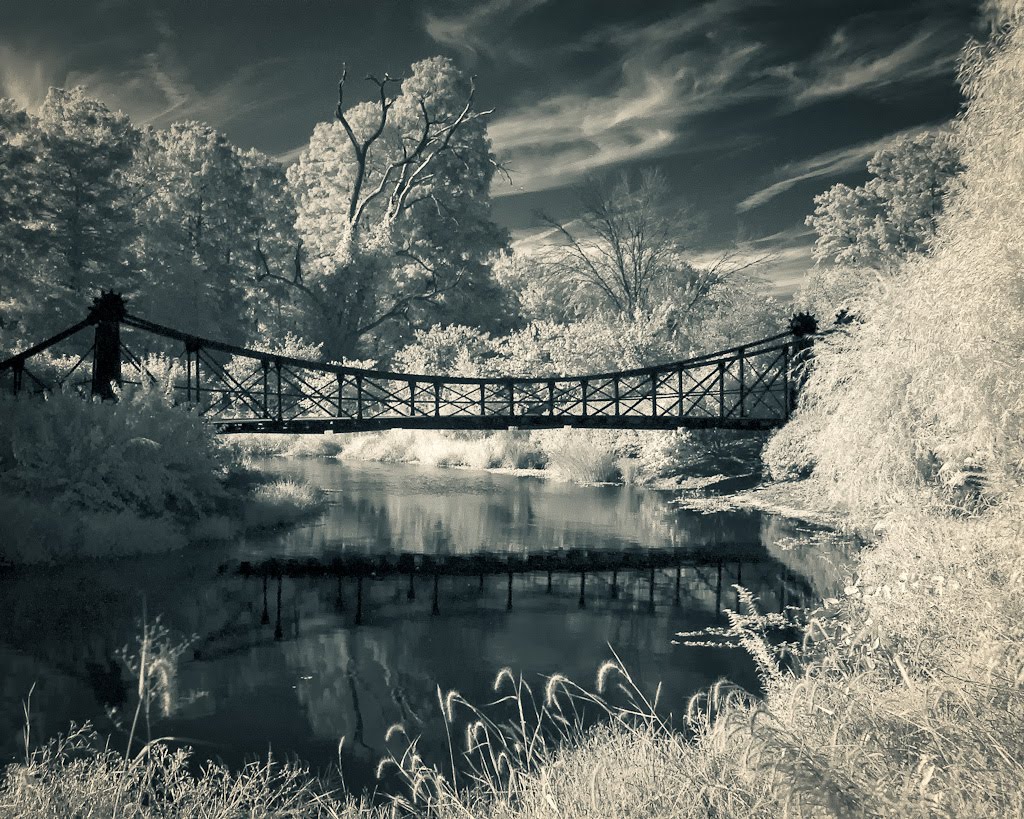
Lafayette Park Pond #1, Infrared HDR Test


The Lafayette Park pond and bridge is one of those little garden jewels, maintained by neighborhood volunteers.  I remember visiting it in the '50s when it was a public wading pool.  This picture is made from three one-stop brackets shot through a Cokin P007 filter and processed in Lightroom 3, Nik HDR Efex and Nik Silver Efex Pro.  


Lens: Nikkor AF 24-85mm f2.8-4 IF 
Camera: Nikon D100
Exposure: ISO 200, three 1-stop brackets, 50mm @ f/16 @ 0.8s, Cokin P007 filter, Auto WB, tripod, RAW
Lighting: Daylight filtered through trees
Location: Lafayette Park, St. Louis GPS
Dates: Capture - June 25, 2006, Processing - October 27, 2010
Processing: Lightroom 3, Nik HDR Efex, Nik Silver Efex Pro, Photoshop CS5

Tuesday, October 26, 2010

The Ruins #4, Infrared Single Image HDR Test


To round out the my first set of tests using Nik HDR Efex on infrared capture, I picked a fairly flat single image taken from approximately the same angle and time of day as Ruins #3, but I did not bracket for reasons that escape me.  Here is the workflow...


This is the image, straight out of the camera, nearly one stop under exposed and the light is very flat, direct sunlight.


Step #1 in Lightroom 3, I boosted exposure, contrast and brightness, then set a custom color balance using the eyedropper tool on the lightest piece of stone I could find. 


Step #2 in Nik HDR Efex, I used my "Realistic Light" custom preset to pull the detail out of the stone and the Lens 1 finish setting added some depth.


Step #3 in Photoshop CS5, I swapped the red and blue channels, made a small levels adjustment, then cropped for 11x14 back in Lightroom.  

Step #4 in Nik Silver Efex Pro, I used my "Structure w/Split Tone" custom preset with a red filter to make the final picture.

Using Nik HDR Efex for tone mapping on the single image really helped delineate detail in the stonework.  However, comparing this picture with HDR images made with bracketed shots clearly shows to me that multiple exposures are a must if at all possible.  

Lens: Nikkor AF 24-85mm f2.8-4 IF 
Camera: Nikon D100
Exposure: ISO 200, 30mm @ f/16 @ 0.8s, Cokin P007 filter, Auto WB, tripod, RAW
Lighting: Daylight
Location: Tower Grove Park, St. Louis GPS
Dates: Capture - October 5, 2008, Processing - October 23, 2010
Processing: Lightroom 3, Nik HDR Efex, Nik Silver Efex Pro, Photoshop CS5

Monday, October 25, 2010

The Ruins #3, Tower Grove Park, Infrared HDR Test


The Ruins fountain in Tower Grove Park is a favorite backdrop for many a portrait made in St. Louis.  This picture is made of only two shots, one stop apart, using a Cokin P007 Infrared filter.  I used as slightly different workflow that I think will become standard for me.  This final monochrome was made in Nik Silver Efex Pro using my "Leica I" preset, then toned in Lightroom 3.


This is the lighter of the two exposures, straight from the camera.  The processing change was to make the custom color adjustment on both images before HDR processing.


This is the output from Nik HDR Efex.  The color is about the same as the adjusted files going in, so the tone mapping was applied only to detail and exposure.


The next step comes in Photoshop CS5 to swap red and blue channels and tweak levels slightly.  This really looks like an Infrared Ektachrome slide.

I always take an unfiltered reference shot as part of the infrared workflow. 


Lens: Nikkor AF 24-85mm f2.8-4 IF 
Camera: Nikon D100
Exposure: ISO 200, two brackets around 50mm @ f/16 @ 0.5s, Cokin P007 filter, Auto WB, tripod, RAW
Lighting: Daylight
Location: Tower Grove Park, St. Louis GPS
Dates: Capture - October 5, 2008, Processing - October 23, 2010
Processing: Lightroom 3, Nik HDR Efex, Nik Silver Efex Pro, Photoshop CS5

The Ruins #2, Tower Grove Park, HDR Test


The Ruins in Tower Grove Park was built from limestone salvaged from the Lindell Hotel, which burned down in 1857.  This picture started with a Cokin P007 infrared filter and four shots one stop apart, pulled into Nik HDR Efex and processed with my custom "Dark Vintage" preset.  I adjusted custom white balance in Lightroom, the used Photoshop CS5 to swap red/blue channels and do some retouching (see below).  The final monochrome came from Nik Silver Efex Pro and sepia/blue split tone applied in Lightroom 3.


One big problem for this shot was lens flare.  The Cokin system is great except for situations where sunlight falls directly on the filters.  The P007 filter is so dark, you can't see anything in the viewfinder with it in place.  I didn't notice that sunlight was bouncing off the the filter and causing this crazy lens flare in the zoom.  The HDR processing really enhanced it, too.


Lens: Nikkor AF 24-85mm f2.8-4 IF 
Camera: Nikon D100
Exposure: ISO 200, four brackets around 30mm @ f/16 @ 1s, Cokin P007 filter, Auto WB, tripod, RAW
Lighting: Daylight
Location: Tower Grove Park, St. Louis GPS
Dates: Capture - October 5, 2008, Processing - October 24, 2010
Processing: Lightroom 3, Nik HDR Efex, Nik Silver Efex Pro, Photoshop CS5

Sunday, October 24, 2010

The Ruins, Tower Grove Park, HDR Infrared Test


I had always wondered about this because the scene feels unusually whimsical.  The "Ruins" is a section of Tower Grove Park, which includes a pond and fountain, that was assembled from artistically arranged stonework taken from the real ruins of the Lindell Hotel, which burned to ground in 1857, only four years after it was built.  The idea to recycle the stone came from none other than Henry Shaw.  This is a picture of some of that stone along a footpath behind the pond.  Nik Silver Efex Pro produced this monochrome conversion using a red filter, with the sepia/blue split tone applied in Lightroom 3. 


The picture started off with a Cokin P007 infrared filter and three 1 stop brackets.  This is the lightest shot as it came out of the camera.

  
This is how the image looked coming out of Nik HDR Efex, using my "Dark Vintage" preset, after setting the custom white balance in Lightroom 3 by using the eyedropper on a leaf highlight.  You can see that the process lifted quite bit of detail from the stone work and improve separation with the foliage.


The final step before monochrome conversion is to use Photoshop to swap the red and blue color channels and adjust the levels to further expand the dynamic range.

  
I always take an unfiltered reference shot as part of the infrared workflow.

Lens: Nikkor AF 24-85mm f2.8-4 IF 
Camera: Nikon D100
Exposure: ISO 200, three brackets around 48mm @ f/11 @ 1/4s, Cokin P007 filter, Auto WB, tripod, RAW
Lighting: Daylight
Location: Tower Grove Park, St. Louis GPS
Dates: Capture - October 5, 2008, Processing - October 23, 2010
Processing: Lightroom 3, Nik HDR Efex, Nik Silver Efex Pro, Photoshop CS5

Sunday, October 3, 2010

Trees, Infrared HDR Test #1


While I had the camera out this morning, I thought to make a quick set of brackets to test infrared HDR.  This is the final shot, using Lightroom to make the monochrome conversion from last picture in this post, with an aqua/sepia split tone and film grain like Ilford HP5.


This is how the base exposure looks.  The Nikon D700 is not very sensitive to IR light, so I use a +1 stop exposure adjustment for the two over, two under brackets.  The first step is to combine the brackets using Photoshop HDR Pro.   


The next step is to apply a custom white balance and adjust tone of the HDR image, both of which I did in Lightroom 3.  The new Lightroom 3 develop preset "General - Auto Tone" works very well for the tone adjustment.


Then it is back into Photoshop CS5 to swap the red and blue color channels.  This picture now looks very much like it was shot with KODAK AEROCHROME III Infrared Film 1443.  


Camera: Nikon D700 
Lens: AF NIKKOR 180mm f/2.8D IF-ED "Leni" lens with Cokin P007 filter
Exposure: ISO 200, f/5.6 @ 0.6s, auto WB, RAW, tripod
Lighting: Filtered daylight
Location: Home GPS
Processing: Lightroom 3 and Photoshop CS5

Saturday, October 2, 2010

Backyard Foliage - D700 Infrared Test


I've had the Nikon D700 for more than two years, but until today had not tried shooting infrared with it.  I was not expecting much because reviews say that the D700 has significantly reduced IR sensitivity compared to earlier models, like the D100.  I actually got a nice surprise.  This is the same setup as my previous post, "First Fall Colors", so I won't show the color version here.  I thought I'd share the processing steps for anyone interested.


This is the image as it came from the camera.  I used the Cokin P007 filter, which is deep ruby red and nearly opaque.  It is equivalent to the KODAK 89B written filter with a spectrum transmission of 50% at 720 nm.


The first processing step is to adjust the white balance and tone mapping.  I have a IR daylight custom white balance that I applied, the used the new Lightroom 3 develop preset "General - Auto Tone".


IR captures tend to be very flat, so a levels adjustment is always needed.  I pulled the shot into Photoshop CS5 and used the auto level button.


The grainy sepia version is a close runner-up for the final version.

The Nikon D700 is, in fact, less sensitive to IR than the D100 by about three stops.


Camera: Nikon D700 
Lens: AF NIKKOR 180mm f/2.8D IF-ED "Leni" lens
Exposure: ISO 200, f/4 @ 1/13s, Cokin P007 filter, auto WB, RAW, tripod
Lighting: Filtered daylight
Location: Home GPS
Processing: Lightroom 3, Photoshop CS5 and Nik Silver Efex Pro 

Saturday, August 21, 2010

1902 Worlds Fair Bridge, Infrared


This infrared capture has been through several rounds of processing since the capture in 2006.  I almost gave up on this shot after making a rather disappointing print last month because the inherent tone map yielded very flat images with pasty mid and high values.  However, I think I finally hit on a good combination of processing steps that preserved the long tonal range without clipping Zone VIII and above, which is so important for that silver image look.  

Camera: Nikon D100 
Lens: AF Zoom-NIKKOR 24-85mm f/2.8-4D IF 
Exposure: ISO 200, 24mm @ f/8 @ 1/5s, Cokin P007 infrared filter, tripod.
Lighting: Sunlight, late afternoon
Location: Forest Park, St. Louis, MO
Processing: Lightroom 3, Photoshop CS5, Nik Silver Efex Pro